
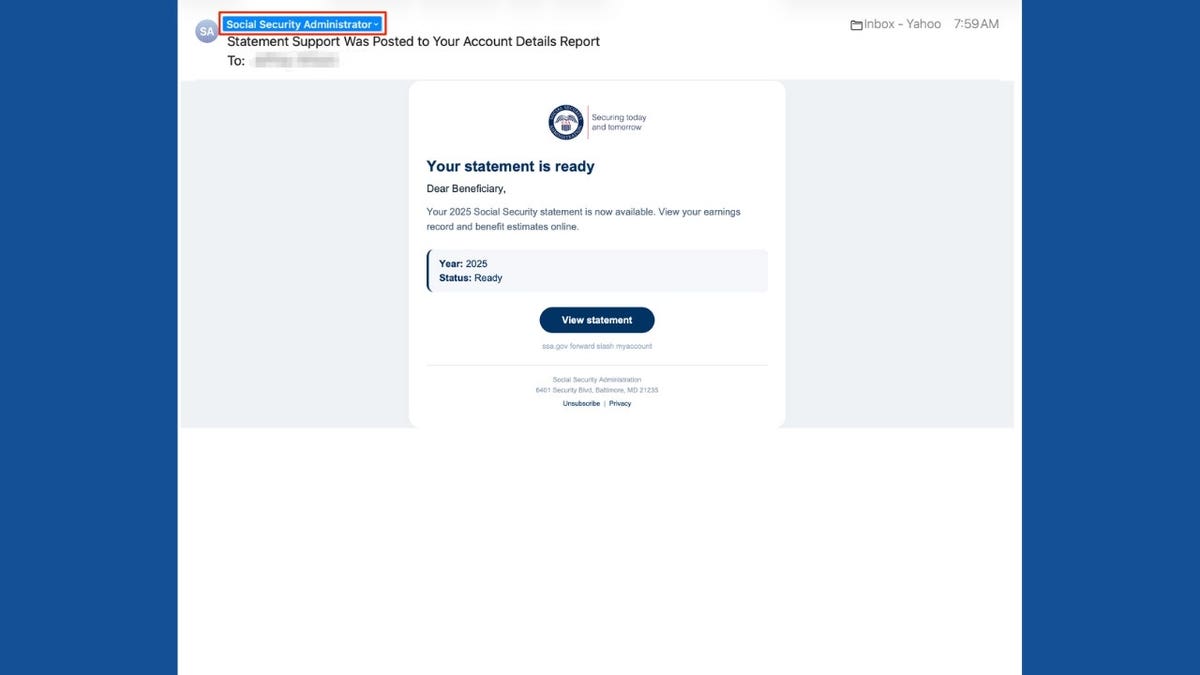
Receiving an email from Social Security often grabs attention due to the importance of retirement benefits and personal earnings history. When such an email announces that your statement is ready, clicking to view it seems reasonable. Unfortunately, scammers exploit this tendency.
Recognizing Scam Emails
A recent scam email appearing professional with the Social Security Administration (SSA) logo invited recipients to view their statement. However, the sender’s email domain lacked any connection to the government, posing a red flag.
The Social Security Administration’s Office of the Inspector General reported a rise in these fraudulent emails, using official-looking designs to deceive.
Spotting Warning Signs
- Check the sender’s complete email address. It should be a .gov domain associated with SSA.
- Generic greetings like “Dear Beneficiary” can indicate a potential scam.
- Be wary of links and addresses not originating from the official SSA website.
Email Buttons Implications
Clicking “View statement” can redirect to phishing sites aimed at stealing credentials or downloading malware.
Determining Email Legitimacy
Yes, Social Security emails statement reminders annually. However, scammers leverage such real communications to create similar fake notifications.
Verify Email Authenticity
- Check sender’s full email details on your device to spot unfamiliar domains.
- Hover over links to view destinations without clicking to see if they match the SSA’s website.
- Verify through SSA’s official site or by direct contact via published phone numbers.
Accessing Social Security Statements Safely
You can check your statement by directly accessing ssa.gov/myaccount without interacting with email links.
Protecting Yourself from Phishing Scams
- Always access information directly through SSA, avoiding unsolicited attachments or links.
- Secure accounts with strong passwords and multi-factor authentication.
- Employ strong antivirus software to identify threats and malware.
- Be cautious in sharing sensitive information.
- Monitor your records regularly for unusual activity.
- Use data removal services to limit exposure of personal details online.
- Report suspicious emails to authorities before deleting.
What to Do if You Were Compromised
- If clicked without sharing info, just close the site and scan for possible malware.
- If passwords were shared, change them immediately using trusted devices, and review account activities.
- If personal information like Social Security number is shared, initiate a recovery plan via IdentityTheft.gov.
- For financial information loss, contact involved institutions and report through official complaint channels.
Identifying scam emails quickly can prevent significant headaches. Always verify government-related communications independently.