
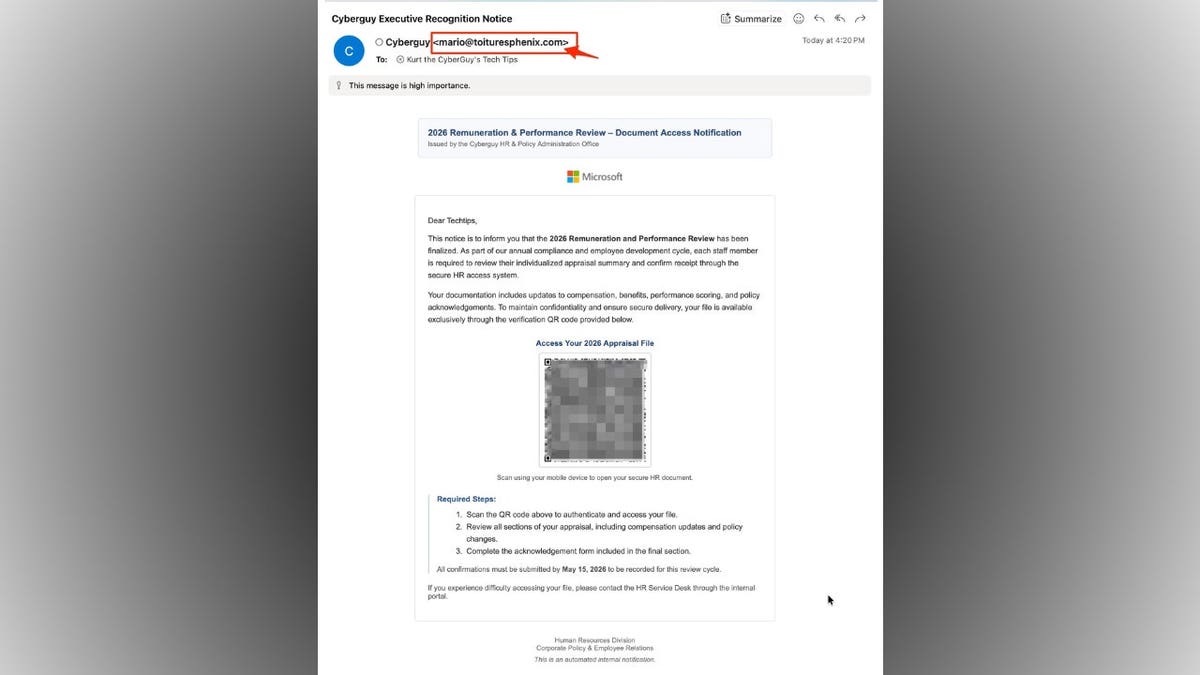
Suspicious emails are circulating that appear to be official HR notices concerning performance reviews. These emails discuss pay updates, benefits, and include a deadline. A QR code is included for accessing your file. Although the email seems to come from an internal HR office, it actually guides recipients to scan the QR code to access their appraisal. This setup is a proven phishing tactic. Scams often move users from computers to phones, making link verification difficult.
Recognizing Phishing Emails
Understanding the various red flags can help you identify potentially harmful emails.
The following are key indicators a message should not be trusted:
Sender’s Email Address
The sender’s address in the email may claim to be from “CyberGuy,” yet the actual email is [email protected]. This discrepancy in domains is a significant indicator of a scam, as legitimate companies use their own domain for HR notices.
Urgency through Deadlines
The email may assert that action must be taken by May 15, 2026. Scammers use urgency to provoke fast reactions and bypass thorough checks.
QR Code Call to Action
Recipients are urged to scan a QR code to access their file, a tactic known as “quishing,” which masks the destination link.
Generic Greetings
Emails starting with greetings like “Dear Techtips” suggest they are aimed at a wide audience rather than personally addressed to you.
Vague HR System Language
Mentioning a “secure HR access system” without specifying a recognizable platform undermines trust and verification.
Inconsistent Branding
A seemingly real Microsoft logo may appear in the email, but logos can be easily reproduced, and formatting might feel generic.
High-Importance Flags
Marking a message as high importance adds pressure and urgency.
Unusual Instructions
The email asks recipients to scan and access a file directly rather than logging into a secure portal, which is not typical for handling sensitive data.
Risks of QR Code Phishing
QR codes are increasingly used in phishing scams due to their widespread familiarity and trust.
Scammers increase your vulnerability by embedding malicious links inside QR codes. Once scanned, you may land on fake login pages resembling legitimate ones.
If a QR code leads to a phishing page, several incidents could occur:
- You may unknowingly provide login details.
- Malware can quietly download onto your device.
- The site may solicit additional personal information.
Stolen login credentials may be used to access company systems or your email account, leading to further attacks.
Protecting Yourself from QR Code Email Scams
Slow reactions can help protect your data from these scams.
- Avoid scanning unexpected QR codes. Visit official websites directly.
- Verify the sender’s domain against the company name.
- Access HR systems using saved bookmarks or known URLs.
- Skepticism should arise from generic greetings like “Dear Techtips.”
- Use known contact methods to confirm with your company.
- Install strong antivirus software to block malicious links.
- Consider using data removal services to reduce online exposure.
- Update devices and apps regularly for security enhancements.
- Enable two-factor authentication for added security.
Overall, phishing emails are adapting with QR codes now tied to fake HR notices. However, remaining cautious and utilizing your own paths for accessing sensitive information is essential.