
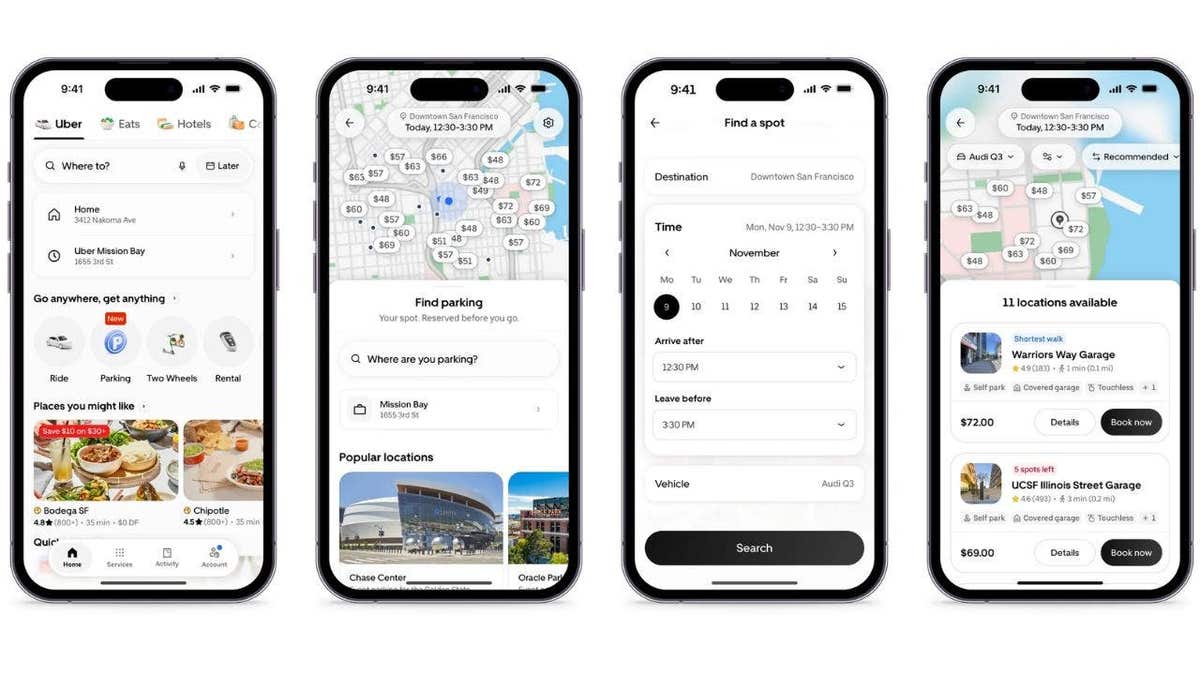
Finding parking in a busy area can be stressful. Uber wants to help with its new feature, Uber Parking. This allows you to book a parking spot before leaving home. The system is designed to save time and reduce frustration.
Uber Parking is part of the Uber app. You can search for available spots, see prices, and make reservations. This feature builds on Uber’s acquisition of SpotHero, adding over 13,000 parking locations in more than 400 cities in the U.S. and Canada.
How to Use Uber Parking
Booking a parking spot with Uber is straightforward. Here’s a step-by-step guide:
- Open the Uber app on your smartphone.
- Find the Parking icon on the home screen.
- Tap Parking and input your destination.
- Select the date and time you’ll need the space.
- Use the map to browse available parking lots and garages.
- Compare prices to choose an option that suits you.
- Filter by garage type, such as self-parking or valet service.
- Enter your vehicle’s details: make, model, and license plate number.
- Confirm and pay using Uber Wallet.
After booking, your digital parking pass appears in the app. Access might be via a QR code or a license plate recognition system. Reservations can be extended or canceled, depending on the policy of the parking facility.
Availability and Expansion Plans
Uber Parking launched in 15 U.S. cities on November 9: Atlanta, Austin, Boston, Chicago, Dallas, Denver, Los Angeles, Miami, Nashville, New York City, Philadelphia, San Diego, San Francisco, Seattle, and Washington, D.C. Uber plans to expand to more areas.
Uber One Membership Benefits
If you’re an Uber One member, you earn 10% back in credits on qualifying parking reservations. These can be used for Uber rides or Uber Eats orders. Check the total parking price against other options before booking.
Future Use for Autonomous Vehicles
Uber is exploring the idea of using parking garages for robotaxis between rides. Autonomous vehicles could rest there, reducing street congestion and operating costs. This is still in development.
Tips for Using Uber Parking
To get the most out of Uber Parking, consider these tips:
- Compare prices with other options before committing.
- Check for garage restrictions like height limits.
- Understand the cancellation policy of your chosen facility.
- Watch out for fake QR codes and rely on the Uber app.
- Use apps like Google Maps to remember your car’s location.
Uber Parking is designed to make your travel smoother and help you find a spot more easily. This feature may reduce time spent circling blocks for parking, while also preparing for future innovations like robotaxis.