
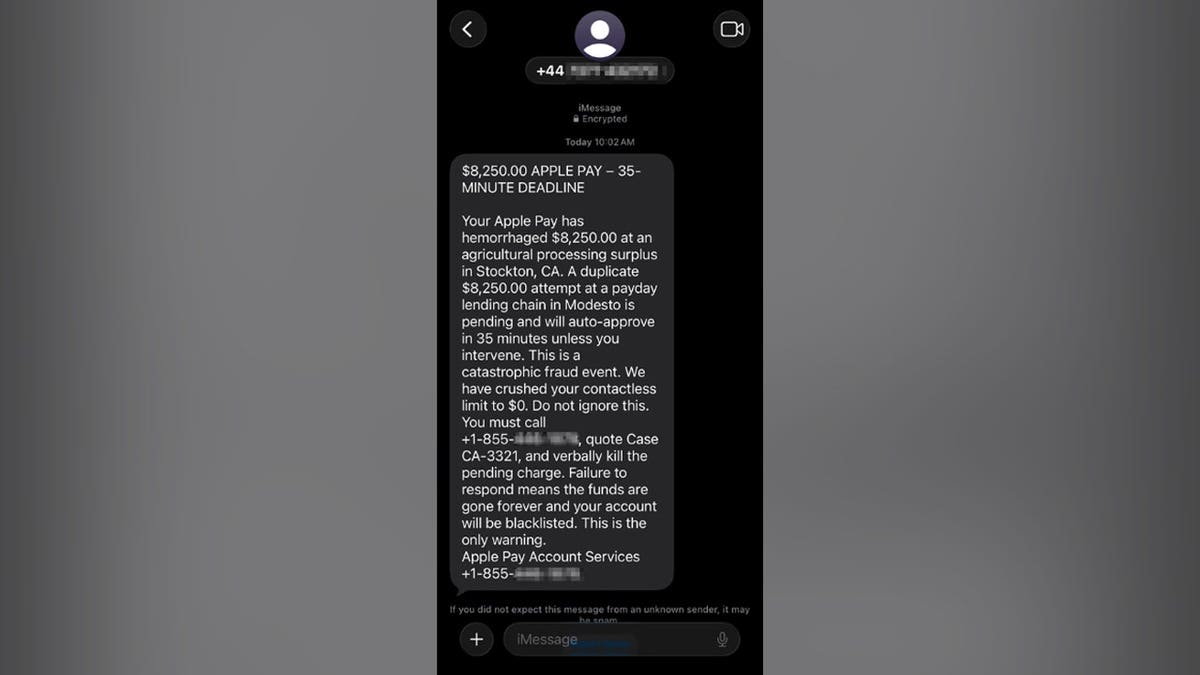
Paul C. in Washington, D.C., recently received a concerning text about an Apple Pay charge of $8,250, suggesting another identical charge would occur in 35 minutes. Such messages aim to create panic before you can rationally assess them.
Understanding the Scam
Paul wisely avoided calling the callback number and sent the text for analysis. Let’s identify the scam indicators and how to verify charges without risking personal information.
The Scam Message Paul Received
The text falsely indicated an $8,250 charge had been processed via Apple Pay, with another pending charge. It included a prompt to call a specific number using a case reference.
Identifying Red Flags
- Mismatch in Numbers: The message came from a UK number, but requested a call to a U.S. toll-free number. Such discrepancies signal potential fraud.
- False Branding: Frequent use of the Apple Pay name and an ‘Encrypted’ iMessage can create false legitimacy, but lack of specific bank or card details is suspicious.
- Panic-Inducing Elements: Uses a large charge and time limit to create urgency, discouraging proper verification.
- Dramatic Language: Overly dramatic terms like ‘hemorrhaged money’ and ‘catastrophic fraud event’ are meant to evoke fear.
- Vague Merchant Description: Named transactions involve non-specific, unclear merchant details.
- Contradictory Claims: The message’s claims about spending limits were inconsistent.
- Direct Instructions to Call: The directive to call, without consulting official apps or bank contacts, reveals intent to scam.
Protecting Yourself
Verification should be done through trusted channels:
- Open the Wallet app and check recent transactions for inaccuracies.
- Contact your bank using the number on your card for any discrepancies.
Reporting the Scam
Save a screenshot of the text before deleting it. Report spam on your device and forward the message to designated spam reporting numbers. Additionally, email Apple’s phishing address.
If You’ve Already Called
Take the following actions based on your interaction:
- If you provided card details, contact your bank immediately.
- Change account passwords and ensure authentication settings are updated.
- Disconnect remote-access software if installed, and run a security scan on affected devices.
- Consider identity protection services if sensitive information was shared.
Preventing Future Scams
Follow these guidelines to avoid falling for similar scams:
- Take time to verify any message starting with a countdown or urgent request.
- Never provide verification codes or allow remote access to your device.
- Invest in strong security software to detect potentially malicious links.
- Remove personal data from broker sites to reduce exposure.
- Use monitoring services if you’re frequently targeted by such scams.
When uncertain about a text message, remain calm, verify information through official means, and report suspicious messages to relevant authorities.